
Millisecond full-text search
Powered by the Tantivy search engine + BM25 relevance scoring. Once indexed, keyword hits are ranked by relevance and returned in milliseconds.
Ferret-AI builds full-text indexes for TXT, Markdown, PDF, Office documents and more. After the initial index, type a keyword to list every matching file in milliseconds, with matching paragraphs highlighted. Written in pure Rust and shipped as a single file — no network, no upload.
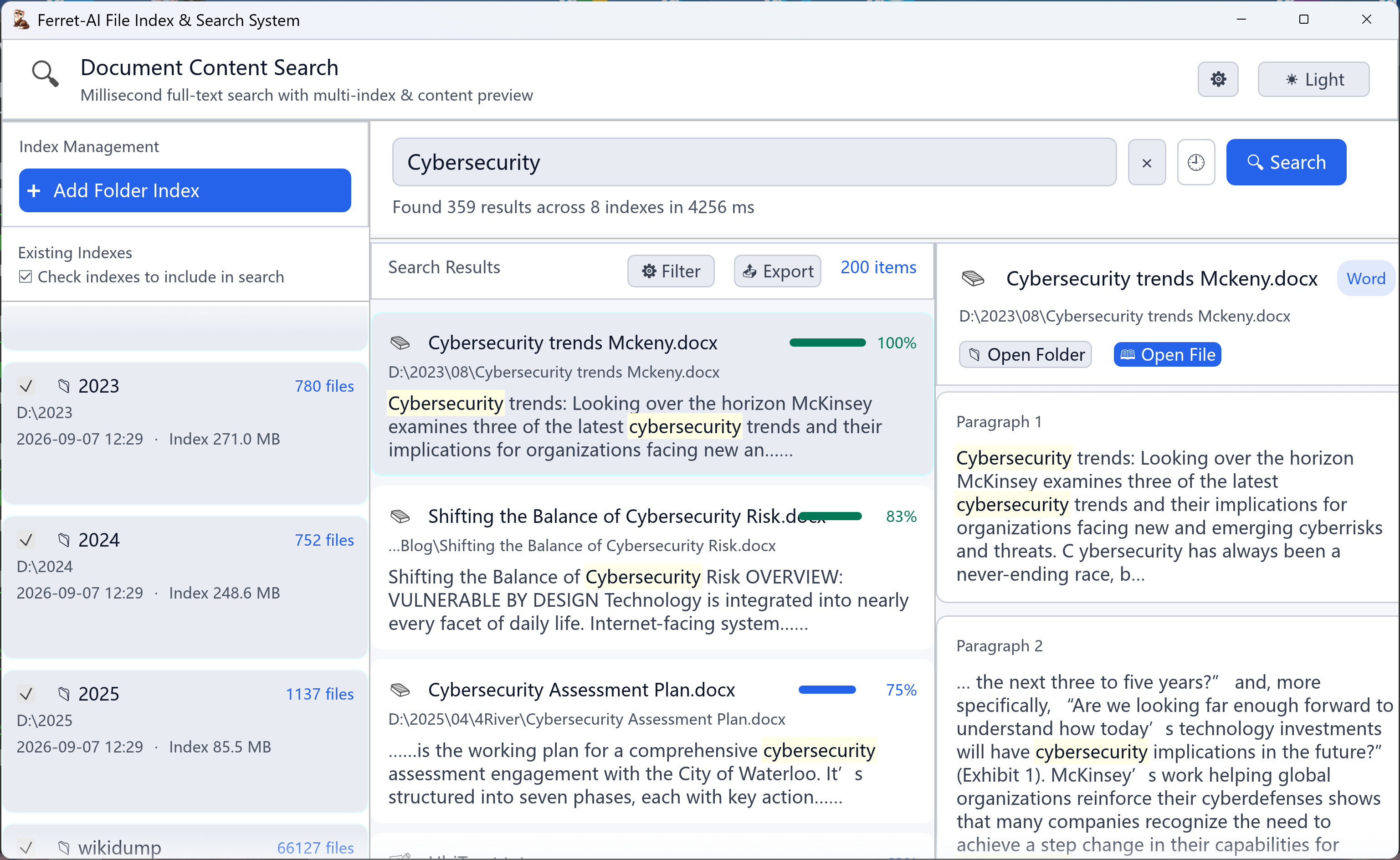
Index once, benefit forever. Surface the content buried deep in your documents, anytime.
Powered by the Tantivy search engine + BM25 relevance scoring. Once indexed, keyword hits are ranked by relevance and returned in milliseconds.
Built-in Chinese tokenization (Lindera-enhanced config). No more awkward character-by-character matching — mixed Chinese/English content hits precisely.
Out of the box: TXT, Markdown, PDF, Word, Excel, PPT, HTML, JSON, CSV and common code files. Plain text and Office documents are treated equally.
Each folder gets its own index. Tick to include it in searches — multi-select supported. Index data is stored centrally; rebuild and delete never interfere.
The result list and detail panel highlight hits byte-accurately, showing you exactly which paragraph each hit lives in.
Index building runs on a separate thread, so the UI stays responsive. Progress bars and notifications give real-time feedback while you keep searching other ready indexes.
Search results can be exported as TXT or CSV. CSV ships with a UTF-8 BOM so Excel opens it without mojibake — great for archiving and sharing.
Ctrl+F to focus search, arrow keys to move between results, Enter to open a file. Handles hands-on-keyboard workflows with ease.
Unlike “general tools + online services”, Ferret-AI is designed from the ground up for privacy, speed and size.
All indexing and search happen on your machine — zero upload. Contracts, code, private notes: safely entrusted to Ferret-AI.
No WebView, no Node.js, no Electron. A single executable of about 10–15 MB — green, no-install, portable.
Native Rust compilation: fast cold start, low memory usage. Indexing and retrieval never pass through a script interpreter, so speed is predictable.
Light/dark palettes are remembered automatically — comfortable for long night sessions.
Deeply optimized for Windows (native dialogs, Explorer integration), while also supporting macOS and Linux.
Built-in digital-signature-based licensing. Without a license, a 6-month trial is generated automatically; expiry popups require no online activation.
| Comparison | Ferret-AI | DocFetcher | Online drive search |
|---|---|---|---|
| Search method | Full-text content | Full-text content | Content (requires upload) |
| Data privacy | Fully local | Fully local | Data in the cloud |
| Deployment size | Single file 10–15 MB | 88 MB, requires JDK 8 | Needs internet |
| Chinese support | Smart tokenization | Average | Good |
| Relevance ranking | BM25 relevance | BM25 relevance | Good |
| Offline |
Consistent with the Tantivy QueryParser: from a single keyword to full boolean expressions.
wordSingle keyword searchword1 word2All words present (AND)"exact phrase"Exact phrase matchword1 OR word2Any word matches+must -excludeMust include / excludeThe full-text retrieval architecture has offline indexing and online recall tiers…
Q3 goal: refine the retrieval experience, introduce RAG smart Q&A…
Integration for retrieval and RAG scenarios…
Try different syntax in the box and watch hits and highlights change.
No install or configuration. Download, run, and build your first index.
Click “Add Folder Index” in the top-left and pick the directory to search. You can add multiple folders at once; each gets its own independent index.
The progress bar in the top-right updates in real time, all in the background — keep doing other things. An “index complete” toast appears when done.
Tick the indexes to search on the left (multi-select), type keywords in the top box, then press Enter or click the “Search” button.
Click a file in the results list; matching paragraphs (highlighted) appear on the right. Click “Open File” or “Open Folder” to jump straight there.
Frequently used keywords are recorded automatically (up to 20) — reuse them from the dropdown.
When files change a lot, click “Rebuild” on the index card to re-index that folder.
The settings panel adjusts light/dark theme, results per page, and log level.
Enable the “filter dev directories” option to automatically skip node_modules, target, and similar folders.
On Windows: %LOCALAPPDATA%\FileSearch\; macOS: ~/Library/Application Support/FileSearch/; Linux: ~/.local/share/FileSearch/. Deleting an index only removes index data — original files are unaffected.
Not at all. Indexing, tokenization and retrieval all run locally. No file content or index data is ever uploaded.
TXT, Markdown (.md), PDF, Word (.doc/.docx), Excel (.xlsx), PPT (.pptx), HTML, JSON, CSV, and almost any plain-text code file.
Encrypted PDFs and password-protected Office documents can’t have their content parsed — they are skipped or fail during indexing. Very large binary files (several GB) are slow to parse, so it’s best to index text-oriented folders.
The software ships with built-in digital-signature licensing: without a license, a 6-month trial is generated automatically. For a full license, contact us for a signed license file and place it in the program directory. Commercial use requires a license.
Free trial, download and go. Pick your platform and build your first index in minutes.
Windows 10 / 11
Download for Windows ~10–15 MB · no installmacOS 12+
Download for macOS Coming soonMajor distributions
Download for Linux Coming soonTech stack: Rust + Native UI + Tantivy · Commercial use allowed.